


Page 72 - Demo
P. 72
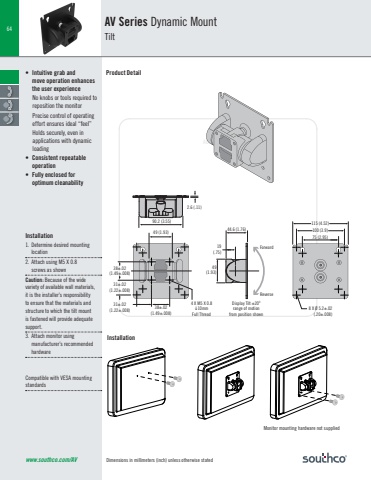
Dimensions in millimeters (inch) unless otherwise statedACTUAL SIZE64www.southco.com/AV90.2 (3.55)2.6 (.11)49 (1.93)38±.02(1.49±.008)38±.02(1.49±.008)31±.02(1.22±.008)31±.02(1.22±.008)4 X M5 X 0.810mmFull Thread44.6 (1.76)ForwardReverse49(1.93)19(.75)Display Tilt ±200range of motionfrom position shown100 (3.9)75 (2.95)115 (4.52)8 X Ø 5.2±.02(.20±.008)• Intuitive grab and move operation enhances the user experienceNo knobs or tools required to reposition the monitorPrecise control of operating effort ensures ideal “feel” Holds securely, even in applications with dynamic loading• Consistent repeatable operation• Fully enclosed for optimum cleanabilityAV Series Dynamic MountTiltProduct DetailInstallation1. Determine desired mounting location2. Attach using M5 X 0.8 screws as shownCaution: Because of the wide variety of available wall materials, it is the installer’s responsibility to ensure that the materials and structure to which the tilt mount is fastened will provide adequate support.3. Attach monitor using manufacturer’s recommended hardwareCompatible with VESA mounting standards4x Ø5.4 ±0.15(4x Ø0.213 ±.006)4x M5 x 0.8 screws(not provided)38 ±0.2(1.50 ±.008)38 ±0.2(1.50 ±.008)Snap-on wire retaining coverMonitor mounting hardware not suppliedInstallation


